
Why your iPhone vibration stops working: fixes that work
- 2 days ago
- 6 min read
Your iPhone stops vibrating most often because of disabled haptic settings, an active Focus or Do Not Disturb mode, a software glitch after an iOS update, or a fault with the Taptic Engine. The good news is that most of these causes are fixable in under a minute without any tools.
Here is what to check first:
Play Haptics in Ring Mode / Play Haptics in Silent Mode turned off in Settings > Sounds & Haptics. Both toggles need to be on for vibration to work in each respective mode.
System Haptics switched off globally, which removes all haptic feedback including keyboard clicks and switch interactions.
Do Not Disturb or a Focus mode silently active. Look for a moon icon in your status bar or Control Centre.
Accessibility Vibration toggle disabled. Go to Settings > Accessibility > Touch and confirm Vibration is on.
A magnetic phone case interfering with the Taptic Engine, causing erratic or absent feedback.
A software bug introduced by a recent iOS update, resolvable with a restart or software update.
Taptic Engine hardware failure, most likely if no haptic feedback occurs in any scenario whatsoever.
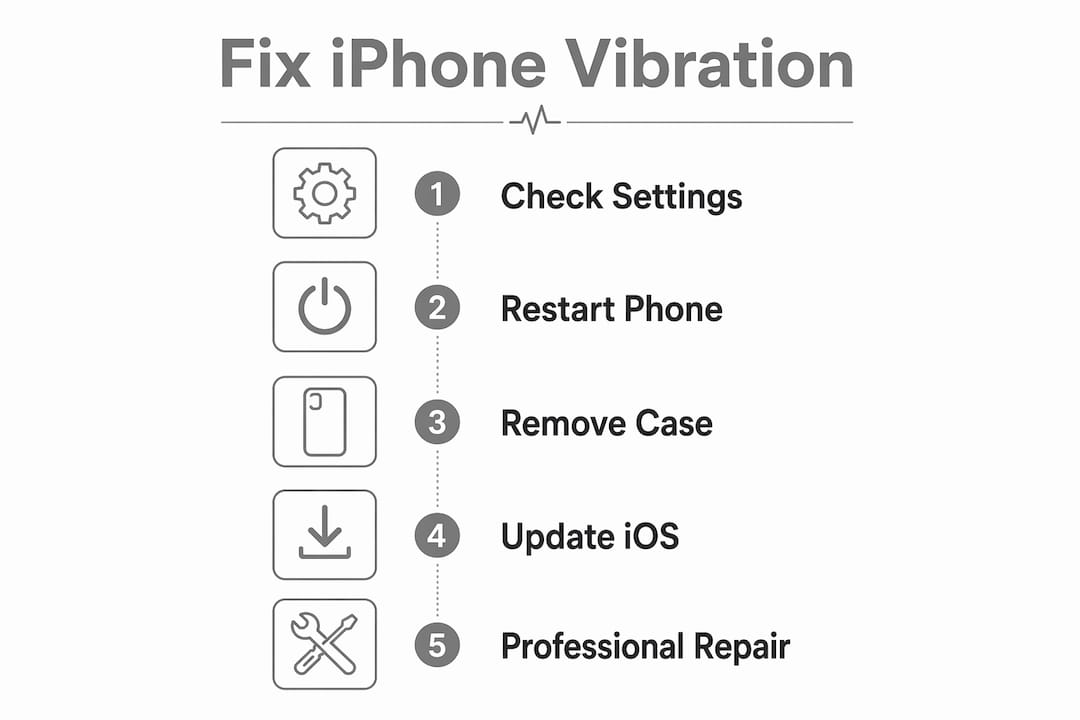
How to fix iPhone vibration step by step
Work through these steps in order. Most users resolve the problem in under one minute by enabling the correct settings.
Check the Ring/Silent switch or Action Button. The small switch on the upper-left edge of your iPhone controls which vibration mode is active. If the orange stripe is visible, the phone is in Silent mode. On iPhone 15 Pro and later, the Action Button replaces this switch; go to Settings > Action Button to confirm it is set to toggle Silent mode.
Enable Vibrate on Ring and Vibrate on Silent. Open Settings > Sounds & Haptics. Turn on both “Play Haptics in Ring Mode” and “Play Haptics in Silent Mode.” These two settings are independent, so one can be off while the other is on.
Turn on System Haptics. Scroll to the bottom of the Sounds & Haptics screen. If System Haptics is off, you lose all haptic feedback everywhere on the phone, not just calls.
Check Focus modes and Do Not Disturb. Focus modes suppress vibrations and can activate automatically based on time, location, or app. Swipe into Control Centre and tap any active Focus icon to disable it.
Review per-app notification settings. Go to Settings > Notifications > [app name] > Sounds. Under Haptics, confirm a pattern is selected rather than “None.” Apps like WhatsApp also have their own in-app notification settings that must allow haptics independently.
Check Accessibility settings. Go to Settings > Accessibility > Touch and confirm the Vibration toggle is on. Also check Settings > Accessibility > Motion; if Reduce Motion is enabled, it can weaken or remove haptic feedback across the system.
Restart your iPhone. A restart clears temporary system bugs that can disable vibration even when all settings look correct. This step is frequently skipped but often works after a software update.
Update to the latest iOS. Go to Settings > General > Software Update. Some iOS updates introduce vibration bugs, and Apple typically patches them in the next point release.
Test the Taptic Engine using the vibration creator. Go to Settings > Sounds & Haptics > Ringtone > Vibration > Create New Vibration. Tap the screen repeatedly. If you feel nothing at all, hardware failure is likely.
Reset All Settings as a last software step. Go to Settings > General > Transfer or Reset iPhone > Reset > Reset All Settings. This restores all preferences to default without deleting your photos or apps, and often clears persistent software conflicts.
Pro Tip: Before assuming a hardware fault, remove your phone case entirely and restart. Magnetic cases can interfere with the Taptic Engine and mimic the symptoms of a broken vibration motor.
Common causes of iPhone vibration failure explained
Understanding why your iPhone haptic feedback stops working helps you diagnose the problem faster next time.
Software causes
Misconfigured Sounds & Haptics settings are the most frequent culprit. The Ring and Silent vibration toggles are independent, so disabling one leaves the other unaffected, which confuses many users.
Focus mode interference. Focus modes can be customised to mute specific apps and contacts, meaning vibration may fail only for certain notifications rather than all of them.
iOS update bugs. Documented reports exist after iOS 17.4 and 17.5 where haptics stopped working for some users. Updating to the latest version usually resolves these.
Vibration pattern set to “None.” If the haptic pattern for a ringtone or alert is set to None, no buzz will occur even if all other settings are correct.
Hardware causes
Taptic Engine failure. If no haptic feedback occurs in any scenario, including the Create New Vibration test, the linear actuator inside the phone has likely failed and needs professional replacement.
Physical switch malfunction. Dirt or a hardware fault on the Ring/Silent switch can leave the phone stuck in one mode, which users often mistake for a software problem.
Magnetic case interference. Magnetic accessories cause electromagnetic interference with the Taptic Engine’s linear actuator, producing erratic or absent vibration.
Post-repair ribbon cable disconnection. If vibration stops immediately after a repair, a technician may have left the Taptic Engine ribbon cable disconnected during reassembly.
Battery health and vibration
A severely degraded battery can cause the iPhone to throttle performance, which occasionally affects the Taptic Engine’s power draw. If your battery health is below 80% and vibration is inconsistent, battery replacement may resolve both issues together.
How to tell software from hardware

Symptom | Likely cause |
Vibration fails only on calls | “Play Haptics in Ring Mode” is off |
Vibration fails only in Silent mode | “Play Haptics in Silent Mode” is off |
One app’s notifications do not vibrate | Per-app haptic pattern set to None |
No haptic feedback in any scenario | Taptic Engine hardware failure |
Vibration stopped after a recent repair | Ribbon cable disconnected during reassembly |
Vibration is erratic with a case on | Magnetic case interference |
Distinguishing whether vibration fails only in specific scenarios or completely is the fastest way to separate a settings issue from a hardware fault.
When should you get your iPhone vibration professionally repaired?
Software troubleshooting covers the vast majority of iPhone vibration issues. If you have worked through every step above and the phone still produces no haptic feedback at all, the Taptic Engine has almost certainly failed physically.
Signs you need professional repair:
The Create New Vibration test produces no response whatsoever.
Vibration stopped immediately after the phone was dropped or exposed to liquid.
Vibration failed right after a previous repair, suggesting a disconnected ribbon cable.
The Ring/Silent switch feels loose, stuck, or produces no physical click.
You have reset all settings and updated iOS with no improvement.
Before visiting a repair centre, back up your iPhone via iCloud or your computer, and make a note of exactly when the problem started and whether it followed a drop, a repair, or a software update. That information helps a technician diagnose the fault quickly. Check the signs your iPhone needs repair if you are unsure whether the issue warrants a visit.
DIY Taptic Engine replacement carries real risk. Opening the phone incorrectly can damage the display, Face ID components, or the battery. For most users, the cost and risk of getting it wrong outweigh any saving.
Rapidrepairsldn offers professional iPhone repair in London for Taptic Engine faults, physical switch issues, and post-repair diagnostics. The team can confirm whether the fault is hardware or software before any parts are ordered, so you are never paying for a repair you do not need.
Key takeaways
Most iPhone vibration problems are caused by disabled haptic settings or an active Focus mode, and you can fix them yourself quickly—typically in under one minute—by checking Sounds & Haptics and Control Centre.
Point | Details |
Check settings first | Enable Play Haptics in Ring/Silent Mode and System Haptics before assuming hardware failure. |
Focus modes silence vibrations | Do Not Disturb and other Focus modes can activate automatically and suppress all haptic alerts. |
Use the vibration creator test | Settings > Sounds & Haptics > Ringtone > Vibration > Create New Vibration confirms Taptic Engine function. |
Magnetic cases cause interference | Remove any magnetic case and restart before concluding the vibration motor is broken. |
Hardware failure needs a professional | If no haptic feedback occurs in any scenario, Taptic Engine replacement requires specialist repair. |
Recommended
Comments