
Why your iPhone screen flickers: causes and fixes
- 1 day ago
- 8 min read

iPhone screen flickering is defined as the display pulsing, flashing, or glitching in a way that disrupts normal use. It is one of the most reported common iPhone screen problems, and the root cause is almost always either a software conflict or a hardware fault. Understanding which one you are dealing with saves you time and money. Software issues are far more common and usually fixable at home. Hardware faults require professional attention, but even those follow predictable patterns that you can learn to spot.
Why does my iPhone screen flicker?
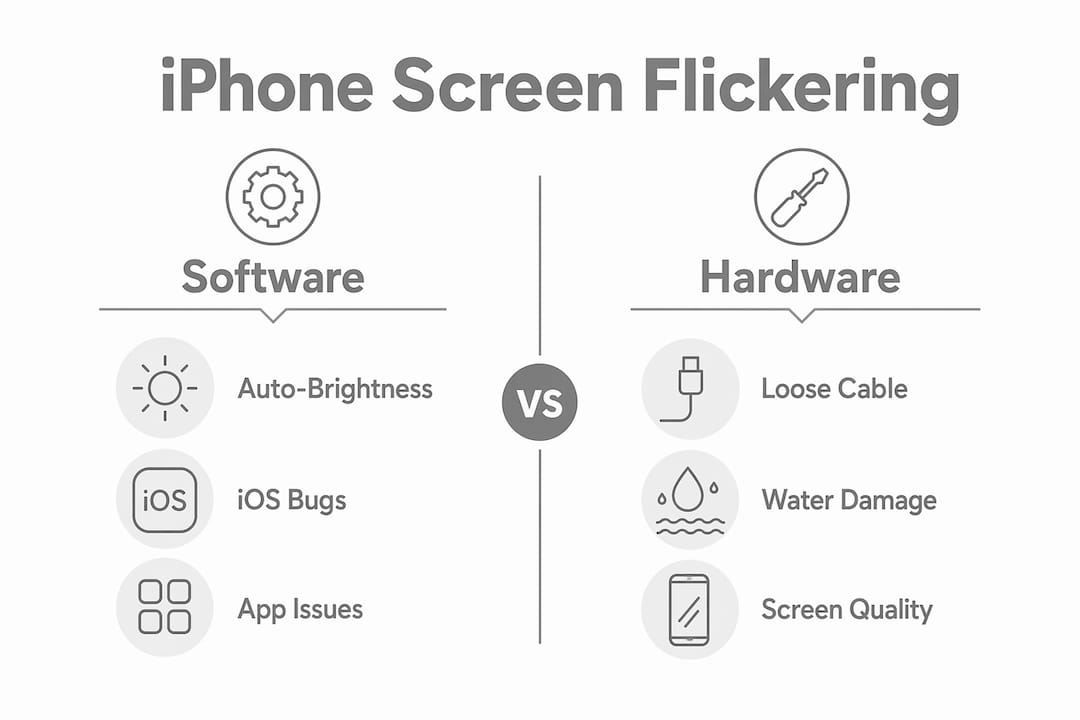
Screen flickering on an iPhone falls into two clear categories: software-related and hardware-related. Software issues cause flickering most of the time, and they are resolved through non-invasive steps without opening the device. Hardware repair becomes necessary after physical damage such as drops or water exposure.
The most common software triggers include iOS bugs after updates, misconfigured display settings, and app-specific rendering errors. On the hardware side, the main culprits are loose display connectors, water damage to display components, and failures in the display driver IC on the logic board. Knowing which category applies to your situation is the first step toward fixing it.
What software factors commonly cause iPhone screen flickering?
Software is responsible for the majority of flickering complaints, and the fixes are often quick.
Auto-Brightness and True Tone conflicts
Misconfiguration of Auto-Brightness and True Tone causes brightness pulsing that many users misidentify as a hardware fault. Both features rely on ambient light sensors, and when they conflict, the display brightness shifts erratically. Repair professionals recommend toggling these settings off and on again as the very first troubleshooting step. You can find Auto-Brightness under Settings > Accessibility > Display & Text Size, and True Tone under Settings > Display & Brightness.
iOS bugs and app rendering issues
iOS updates occasionally introduce display driver bugs that cause flickering across the entire interface. If your screen started flickering shortly after an update, a software bug is the most likely cause. App-specific issues also occur when an application uses rendering methods that conflict with ProMotion’s variable refresh rate on newer models. Updating both iOS and the affected app usually resolves this.
Flash for Alerts
The ‘Flash for Alerts’ accessibility setting causes the screen to flash intentionally during incoming notifications. Many users mistake this for a fault. Checking and disabling it takes under one minute via Settings > Accessibility > Audio & Visual.
Common software causes at a glance:
Auto-Brightness conflicting with the ambient light sensor
True Tone adjusting incorrectly in mixed lighting
iOS bugs introduced after a major update
App rendering conflicts with ProMotion refresh rates
Flash for Alerts enabled in Accessibility settings
Pro Tip: Before assuming hardware damage, check your iOS version. If you updated within the past two weeks and flickering started immediately after, roll back or wait for a patch update from Apple.
How can hardware problems lead to screen flickering on an iPhone?
Hardware faults produce flickering that software fixes cannot resolve. Recognising the symptoms early prevents further damage.
Loose display connectors
A partially unseated display flex cable causes flickering specifically when you change the device’s orientation or apply light pressure to the frame. This is a hallmark symptom. Reseating the cable takes 10–15 minutes and resolves the issue without replacing any parts. Repair costs for this procedure typically fall in the £20–£50 range.
Water damage
Water exposure corrodes the contacts between the display and the logic board. The flickering from water damage tends to worsen over time rather than staying consistent. If your iPhone has been near moisture and the screen is now flickering, act quickly. Delayed treatment allows corrosion to spread to other components.
Display driver IC failure
The display driver IC on the logic board controls how the panel receives and renders image data. When this chip fails, the screen flickers consistently regardless of which app is open or how the device is positioned. This fault requires advanced microsoldering repair, which goes well beyond a standard screen replacement.
Aftermarket screen quality
Low-grade aftermarket LCD replacements are a frequent cause of post-repair flickering. Incell LCD panels used to replace original OLED displays cause flickering due to incompatible backlight and refresh controls. OLED ProMotion displays suffer particularly when fitted with incompatible panels. If your screen started flickering after a repair elsewhere, the replacement part quality is the first thing to question.
Hardware fault indicators:
Flickering triggered by physical movement or pressure on the frame
Screen issues that began after a drop or water exposure
Consistent flickering that no software fix resolves
Flickering that started after a screen replacement at another shop
Pro Tip: Press gently on the corners of your screen while it is flickering. If the flicker changes or stops, a loose display cable is almost certainly the cause.
How to diagnose whether flickering is a software or hardware issue
A systematic approach saves you from paying for repairs you do not need. Follow these steps in order before contacting anyone.
Force restart your iPhone. This clears display driver states and resets active processes. Force restarting resolves a surprising number of flickering cases that appear hardware-related. On most modern iPhones, press and quickly release Volume Up, press and quickly release Volume Down, then hold the Side button until the Apple logo appears.
Note when the flickering occurs. Does it happen during charging, in a specific app, or when you physically move the phone? Flickering tied to movement points to a loose cable. Flickering in one app points to software. Flickering during charging may indicate a power delivery issue.
Toggle Auto-Brightness and True Tone. Turn both off, restart the device, and observe whether the flickering stops. If it does, reconfigure these settings carefully rather than leaving them disabled permanently.
Check your Analytics logs. Go to Settings > Privacy & Security > Analytics & Improvements > Analytics Data. Look for files labelled ‘panic-full’. These entries confirm software crashes that may be causing display issues, separating software bugs from physical faults.
Test temperature. Overheating above 35°C causes the iPhone to lower its refresh rate, which can appear as flickering. If your device feels warm, allow it to cool for 15–30 minutes in a temperate environment and retest. You can read more about iPhone overheating causes and how they affect the display.
Assess whether the issue worsens with physical manipulation. Squeeze the phone gently along its edges. If flickering intensifies, a hardware fault is confirmed and professional diagnosis is the right next step.
Pro Tip: Keep a brief note of exactly when flickering happens, for how long, and under what conditions. This information helps any repair technician diagnose the fault far faster.
What are the practical steps to fix iPhone screen flickering?
Start with the least invasive fixes and work toward more involved solutions.
Software fixes to try at home:
Toggle Auto-Brightness off under Settings > Accessibility > Display & Text Size
Disable True Tone under Settings > Display & Brightness
Turn off Night Shift under Settings > Display & Brightness > Night Shift
Disable Flash for Alerts under Settings > Accessibility > Audio & Visual
Update iOS to the latest version via Settings > General > Software Update
Force restart the device
Remove any thick case or screen protector that may be pressing on the display frame
If none of the above resolves the issue, back up your iPhone via iCloud or a computer, then perform a full iOS restore through a Mac or PC. This eliminates any deep software corruption. If flickering continues after a clean restore, the cause is hardware.
Repair cost reference:
Issue | Typical repair approach | Estimated cost |
Loose display cable | Reseating the flex cable | £20–£50 |
Screen replacement (standard) | Quality panel swap | £60–£200 |
Screen replacement (ProMotion OLED) | OEM-grade panel required | £150–£320 |
Display driver IC fault | Microsoldering on logic board | Varies by technician |
Repair costs for screen replacement vary by model, so it is worth checking what applies to your specific iPhone before committing to a repair. If your screen started flickering after a previous repair, the quality of the replacement part matters enormously. If a high-quality replacement screen still flickers, the fault lies on the logic board, not the panel itself.
Pro Tip: Always back up your iPhone before attempting a restore. A restore wipes the device, and without a backup, your data is gone permanently.
Key takeaways
iPhone screen flickering is almost always caused by either a software misconfiguration or a physical hardware fault, and systematic troubleshooting identifies which one applies before any money is spent.
Point | Details |
Software causes are most common | Auto-Brightness conflicts, iOS bugs, and app rendering issues cause the majority of flickering cases. |
Hardware symptoms follow patterns | Flickering triggered by movement or pressure confirms a loose display cable, not a software fault. |
Aftermarket screens cause problems | Low-grade LCD replacements on OLED models cause persistent flickering due to incompatible refresh controls. |
Logic board faults need specialists | Display driver IC failures require microsoldering and cannot be fixed with a screen swap. |
Diagnose before spending | Force restart, toggle display settings, and check Analytics logs before booking any repair. |
What I have learned from years of iPhone display faults
The most common mistake I see is people assuming the worst immediately. A flickering screen looks alarming, but the majority of cases I encounter at Rapidrepairsldn resolve with a force restart or a settings toggle. Users who panic and book a screen replacement straight away often pay for a repair they did not need.
The second most common mistake is the opposite: ignoring flickering that is clearly hardware-related. Water damage in particular gets dismissed as a minor issue. Corrosion spreads quietly, and what starts as a flickering display can become a dead logic board within weeks if left untreated.
The thing that surprises people most is how often post-repair flickering comes from the replacement part itself. If another shop fitted a cheap LCD where an OLED should be, the display will flicker. This is not a new fault in your phone. It is the wrong part. Quality parts matter, and this is one area where cutting costs creates more problems than it solves.
My honest advice: work through the software steps first, document what you observe, and bring that information to a technician if the problem persists. A good technician will use your observations to diagnose faster and more accurately. And if you have had a previous screen repair elsewhere and the flickering started after that, question the part before assuming the phone itself is faulty.
— Joshua
Rapidrepairsldn can help with iPhone screen flickering
If you have worked through the software fixes and the flickering continues, the fault is almost certainly physical and needs professional attention.
Rapidrepairsldn specialises in iPhone screen repairs and hardware diagnostics, including display cable reseating, quality OLED panel replacements, and logic board microsoldering for display driver IC faults. Every repair uses quality parts to prevent the post-repair flickering that cheap components cause. Pricing is transparent, turnaround is fast, and the diagnosis tells you exactly what is wrong before any work begins. If your screen is flickering and home fixes have not worked, get in touch with Rapidrepairsldn for a reliable assessment.
FAQ
Why does my iPhone screen flicker after an iOS update?
iOS updates occasionally introduce display driver bugs that cause flickering across the interface. Updating to the latest iOS patch or performing a force restart usually resolves this.
Can a loose cable cause iPhone screen flickering?
Yes. A partially unseated display flex cable causes flickering when the device is moved or pressure is applied to the frame. Reseating the cable takes 10–15 minutes and often fixes the issue without replacing any parts.
Why is my iPhone screen flickering after a screen replacement?
Flickering after a screen replacement is most often caused by a low-grade aftermarket panel incompatible with the original OLED display. OLED ProMotion models are particularly affected by incompatible LCD replacements.
How do I know if my iPhone flickering is a software or hardware problem?
Force restart the device and toggle Auto-Brightness and True Tone. If flickering stops, the cause is software. If it continues or worsens when you apply pressure to the frame, the cause is hardware and professional diagnosis is needed.
Is iPhone screen flickering dangerous to ignore?
Flickering caused by water damage should never be ignored. Corrosion spreads over time and can damage the logic board. Software-related flickering carries no immediate risk, but hardware faults that go untreated tend to worsen.
Recommended
Comments