
What causes iPhone black screen: fix it fast
- Jun 21
- 9 min read

An iPhone black screen is defined as a state where the display produces no image, even though the device may still be powered on and running. This is technically called a display driver failure or display output fault, and it has several distinct causes. Understanding what causes iPhone black screen problems helps you fix the right thing, rather than guessing. The most common culprit is a software or firmware crash, but hardware faults, battery issues, and thermal protection can all produce the same symptom. Knowing which cause you are dealing with changes everything about how you respond.
What software problems cause the iPhone black screen?
A software or firmware crash is the leading cause of iPhone black screen issues, accounting for the vast majority of cases where the device is still on. When iOS freezes, the display driver stops receiving instructions and the screen goes dark. You may still hear sounds, feel vibrations, or receive calls, which confirms the phone itself is running. A black screen with vibrations or sounds means the display driver has crashed, not the device.
Several software conditions trigger this:
iOS or firmware crash: A background process corrupts the display driver state, cutting output to the screen.
Corrupted software update: A failed or interrupted iOS update can leave the system in a broken state that prevents the display from initialising.
Full storage: When iPhone storage is completely full, iOS cannot write temporary files it needs to function. This can cause the screen to freeze or go black during normal use.
App-level freeze: A single app consuming all available memory can cause the entire system to lock up, taking the display with it.
The fix for most of these is a force restart. Force restart cuts power to the logic board directly, clearing the display driver crash in a way that a normal shutdown cannot. On iPhone 8 and later, press and quickly release Volume Up, press and quickly release Volume Down, then press and hold the Side button until the Apple logo appears.
Pro Tip: If a force restart does not work, connect your iPhone to a Mac or PC running Finder or iTunes and enter Recovery Mode. This lets you reinstall iOS without erasing your data. If Recovery Mode also fails, DFU (Device Firmware Update) Mode performs a deeper restore and is the last software option before hardware diagnostics.

For severe software corruption, approximately 90% of software-related black screens are resolved by a force restart alone. That figure shows how rarely you need to go further than this single step.
How do hardware faults lead to a black or dim iPhone screen?
Hardware faults produce a black screen that a force restart will not fix. The display system in an iPhone has several physical components that can each fail independently, and the symptoms often look identical from the outside.
The most common hardware causes are:
Loose or damaged display connector: The flex cable connecting the display panel to the logic board can come loose after a drop or during a repair. A faulty display connector causes a black screen even when the phone is fully operational. This is a frequent finding after battery replacements where the screen was not reseated correctly.
Backlight failure: The backlight circuit illuminates the LCD or OLED panel. When it fails, the display still produces an image but it is invisible in normal lighting. The screen appears completely black.
Ambient Light Sensor obstruction: A misplaced screen protector or case can block the sensor near the Dynamic Island or notch. Sensor obstruction causes unintended dimming that looks like a display fault but is not one.
Physical damage to the display panel: Drops can crack internal layers of the screen without visible external damage, causing partial or total loss of display output.
To test for backlight failure at home, shine a torch directly at the screen in a dark room. Shining a torch on the screen can reveal faint content if the backlight has failed but the panel is still working. If you see a dim image, the backlight circuit is the problem, not the panel itself.
Pro Tip: If your iPhone screen went black after a recent drop or repair, a loose display connector is the most likely cause. This is a common iPhone repair issue that a technician can fix quickly by reseating the connector, often without replacing the screen.
Understanding whether you have an LCD or OLED display also matters here. OLED panels fail differently from LCD panels, and backlight faults are specific to LCD models.
Why does thermal protection cause the iPhone screen to black out?
Thermal protection is a built-in iOS safety feature, not a hardware defect. When your iPhone gets too hot, iOS deliberately dims or switches off the display to protect internal components from heat damage.
Temperature threshold: Thermal throttling activates at approximately 45°C, causing the screen to dim significantly or go black entirely. Apple designed this to prevent permanent damage to the battery and processor.
Common triggers: Extended gaming sessions, 4K video recording, GPS navigation in direct sunlight, and charging while running demanding apps all push internal temperatures past this threshold quickly.
How to recognise it: A thermal blackout is usually preceded by the device feeling warm or hot to the touch. iOS also displays an on-screen temperature warning before the screen goes dark, when possible.
How it differs from hardware failure: A thermal blackout resolves on its own once the device cools down. A hardware fault does not. If your screen returns to normal after the phone cools for 10–15 minutes, heat was the cause.
Prevention: Remove the case during charging, avoid using the phone in direct sunlight, and close background apps before recording video. Unexpected screen dimming is often iOS managing heat, not a sign that something is broken.
What role does battery condition play in iPhone screen black issues?
A failing or deeply discharged battery is a frequently overlooked cause of the iPhone display not turning on. Battery problems produce black screens in two distinct ways: the battery is too flat to power the display, or the battery is too degraded to deliver stable voltage.
Key signs of a battery-related black screen:
Deep discharge: When an iPhone battery drains completely, it enters a protection state. A deeply discharged battery typically needs 15–30 minutes of charging before the screen will respond. Plugging in and waiting is the fix.
No response to wired charging: Some iPhones affected by deep discharge do not respond to a wired charger at all. MagSafe or Qi wireless charging can reactivate these devices when wired charging fails. Try a wireless charger before assuming the worst.
Battery health below 80%: Battery capacity below 80% significantly increases the risk of unexpected shutdowns and black screen failures. iOS displays a battery service warning in Settings when this threshold is reached.
Sudden shutdowns at partial charge: If your iPhone shuts off and shows a black screen at 20–40% battery, the battery is no longer delivering accurate readings. Replacement is the correct fix.
Symptom | Likely battery cause | Recommended action |
Screen black after full drain | Deep discharge | Charge for 15–30 minutes before restarting |
No response to wired charger | Battery bug or deep discharge | Try MagSafe or Qi wireless charging |
Unexpected shutdowns at partial charge | Battery health below 80% | Check Settings and replace battery |
Screen black with battery warning shown | Critical battery level | Charge immediately |
Check your battery health by going to Settings > Battery > Battery Health & Charging. Any reading below 80% warrants a replacement, particularly if you are experiencing black screen episodes.
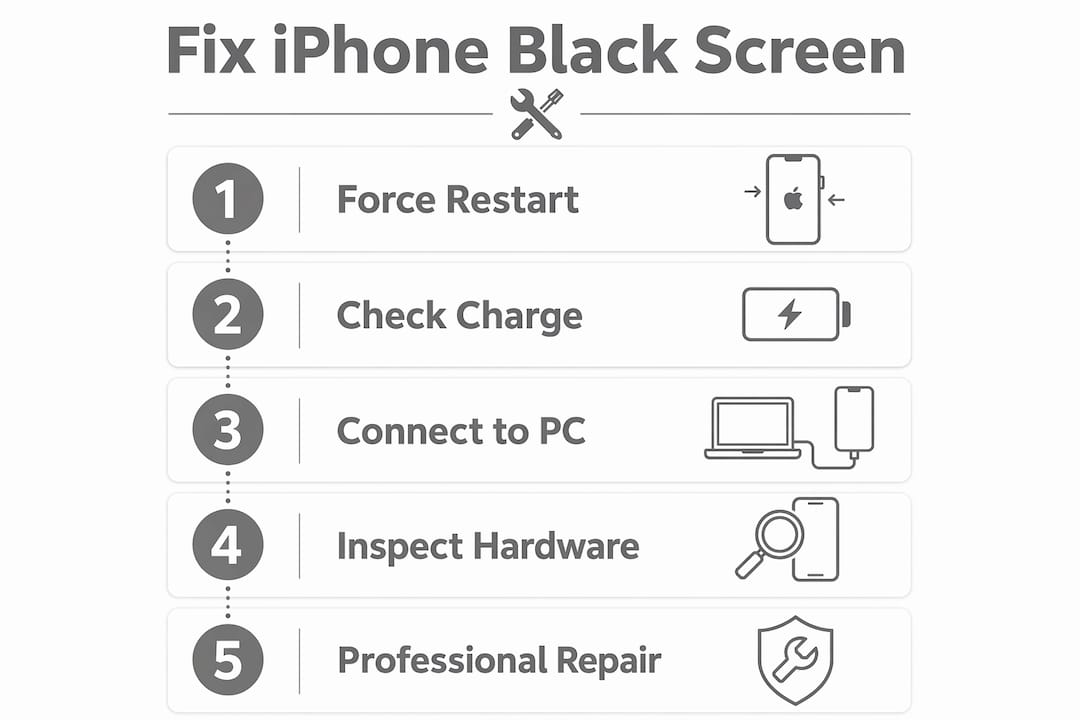
Practical steps to diagnose and fix an iPhone black screen
Working through these steps in order saves time and avoids unnecessary repairs.
Force restart first. On iPhone 8 and later: press and release Volume Up, press and release Volume Down, then hold the Side button until the Apple logo appears. This resolves the majority of software-related black screens.
Check your charger and cable. Plug in using an Apple-certified cable and a known working adapter. Wait 15–30 minutes if the battery may be deeply discharged. Then attempt a force restart again.
Try wireless charging. If the phone does not respond to a wired connection, place it on a MagSafe or Qi pad. Some battery bugs only respond to wireless charging.
Inspect for physical damage. Look for cracks, dents near the screen edges, or signs of liquid exposure. Physical damage points to a hardware fault that software fixes will not resolve.
Check brightness and sensor settings. If the screen is on but very dim, go to Settings > Accessibility > Display & Text Size and disable Auto-Brightness temporarily. Also check whether a screen protector is covering the ambient light sensor.
Enter Recovery Mode. If force restart fails and the phone connects to a computer, use Finder (macOS Catalina and later) or iTunes (Windows) to reinstall iOS via Recovery Mode.
Seek professional diagnostics. If none of the above works, the fault is likely hardware. A loose display connector, backlight failure, or battery replacement requires professional iPhone repair tools and parts.
Pro Tip: Before visiting a repair shop, back up your iPhone via iCloud if possible. If the screen is black but the phone is on, you can enable iCloud backup through Siri by saying “Hey Siri, turn on iCloud backup.”
For a broader look at common iPhone repair issues, display connector faults and battery replacements are among the most frequent jobs technicians handle.
Key takeaways
The most reliable first response to an iPhone black screen is a force restart, which resolves the majority of software-related cases without any tools or technical knowledge.
Point | Details |
Software crashes are the top cause | A force restart clears display driver failures and resolves most black screen cases. |
Hardware faults need professional diagnosis | Loose connectors and backlight failure require physical inspection and specialist tools. |
Thermal protection is intentional | A screen that recovers after cooling is iOS protecting components, not a fault. |
Battery health directly affects the display | Capacity below 80% causes unexpected shutdowns; wireless charging can revive deep-discharge cases. |
Sensor obstruction mimics display faults | A misplaced screen protector blocking the ambient light sensor causes dimming that looks like hardware failure. |
What I have learnt after years of seeing black screen iPhones
The most common mistake I see is people assuming the worst the moment their screen goes dark. In the vast majority of cases, a force restart is all it takes. The phone is not broken. The display driver has simply crashed, and cutting power to the logic board resets it in seconds.
What surprises most people is how often a recent repair is the actual cause. A battery replacement carried out without properly reseating the display connector will produce a black screen that looks catastrophic but takes a technician two minutes to fix. If your screen went black shortly after any repair, that is the first thing to investigate.
The thermal protection point is also widely misunderstood. I regularly speak to people who think their iPhone is failing because the screen goes dark during a long gaming session or while charging in summer. That is iOS doing exactly what it should. Let the phone cool down and the screen comes back. No repair needed.
Battery condition is the one area where people consistently wait too long. A battery below 80% health is not just an inconvenience. It actively causes black screen shutdowns, and those shutdowns put stress on other components over time. Replacing the battery early is cheaper than dealing with the knock-on faults later.
For anything that does not respond to a force restart, wireless charging, or a software restore, get it looked at by a professional. Attempting to open the phone without the right tools causes more damage than the original fault.
— Joshua
How Rapidrepairsldn can fix your iPhone black screen

Rapidrepairsldn specialises in exactly the faults that cause iPhone black screens: display connector reseating, backlight circuit repairs, battery replacements, and full software diagnostics. The team at Rapidrepairsldn works on iPhones of all generations and carries quality parts backed by a warranty, so you are not gambling on the repair holding up. If your force restart did not work and your screen is still dark, book your iPhone screen or battery repair with Rapidrepairsldn and get a same-day diagnosis. Located in Finchley, the workshop handles everything from a loose connector to a full display replacement, and you will know the cost before any work begins.
FAQ
What is the most common cause of an iPhone black screen?
A software or firmware crash is the most common cause. Force restart resolves approximately 90% of software-related black screen failures without any tools.
Why does my iPhone screen go black but the phone is still on?
Vibrations or sounds during a black screen confirm the device is running but the display driver has crashed. A force restart clears this in most cases.
Can a bad battery cause an iPhone black screen?
Yes. Battery capacity below 80% causes unexpected shutdowns and black screen failures. A deeply discharged battery also prevents the screen from powering on until the phone has charged for 15–30 minutes.
How do I know if my iPhone black screen is a hardware fault?
If a force restart, charging, and software restore all fail to bring back the display, the fault is hardware. Shine a torch at the screen in a dark room to test for backlight failure. A faint image confirms the panel works but the backlight circuit has failed.
Why does my iPhone screen go dark in hot weather?
iOS activates thermal protection at approximately 45°C, dimming or switching off the display to protect internal components. The screen returns to normal once the device cools down.
Recommended
Comments