
iPhone cracked screen: temporary fixes that actually work
- 16 hours ago
- 9 min read
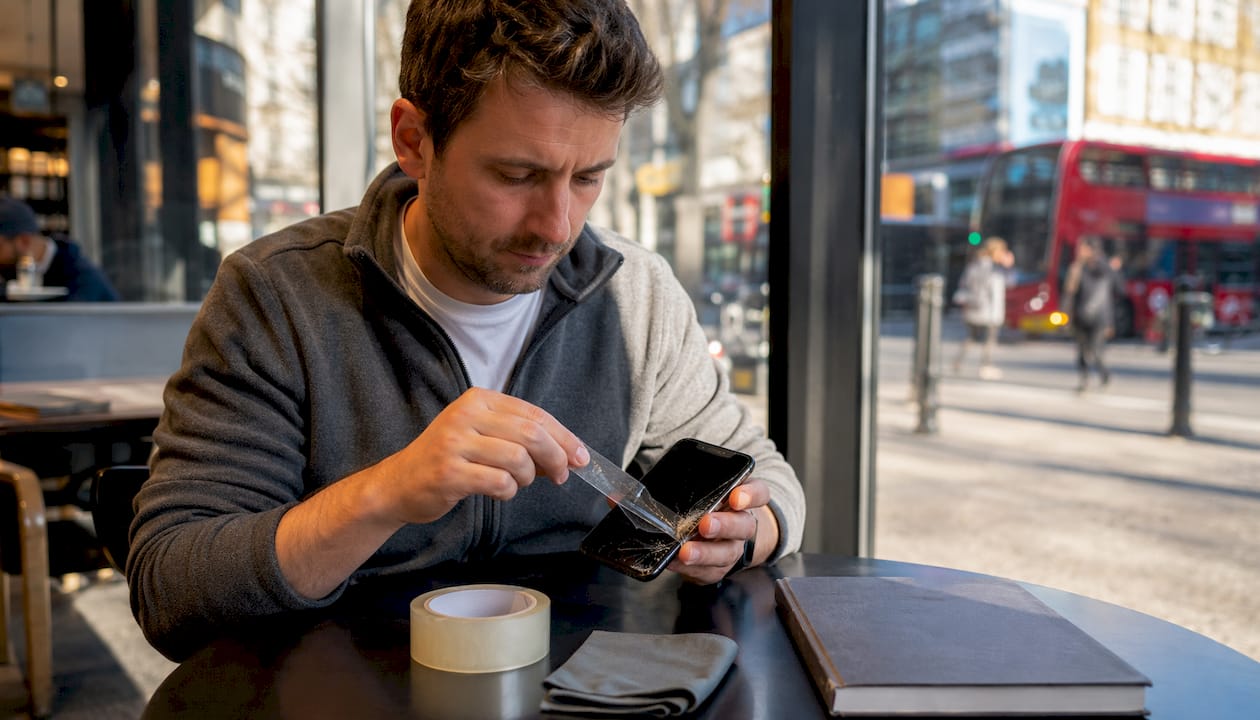
If your iPhone screen has just cracked, apply a layer of clear packing tape over the display right now, then back up your data before anything else. That single step contains loose glass, reduces the risk of cuts, and keeps the screen usable while you arrange a proper repair through AppleCare+ or a reputable local shop such as Rapidrepairsldn.
Quick actions to take immediately:
Power off the device if glass is visibly loose or the screen is behaving oddly
Cover the display with clear packing tape or a tempered glass protector
Back up to iCloud or your computer before the screen deteriorates further
Keep the phone away from children, pets, and water until it is repaired
Temporary fixes buy you time — days to weeks depending on how carefully you handle the phone. They are not a permanent solution, and some situations (battery swelling, screen flickering, overheating) require urgent professional attention rather than a DIY workaround.
Table of Contents
What should you do in the first few minutes after the drop?
Your first priority is safety, not the phone. Cracked glass can shed tiny shards that are easy to miss and painful to encounter later.
Power off the device if the glass is loose, the screen is flickering, or touch is behaving erratically
Remove the case carefully — it can trap glass fragments against your hand
Do not touch exposed glass edges with bare fingers; use a folded cloth or wear thin gloves
Keep the phone face-up on a flat surface and away from children and pets
Check quickly for serious red flags: battery bulging, extreme heat, a burning smell, or a completely black display — any of these mean skip the temporary fix and go straight to a repair shop
Pro Tip: Fold a strip of clear tape sticky-side out and press it gently over the most damaged area. It acts as a temporary handle that lets you move the phone without touching the glass directly, which is especially useful if shards are lifting.
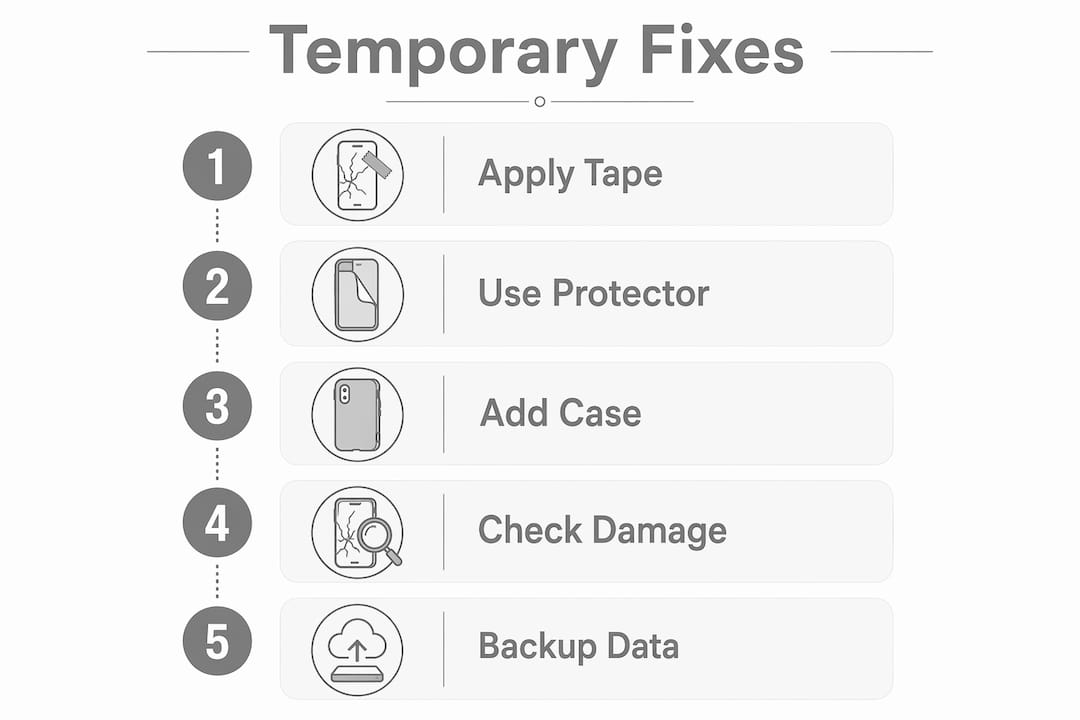
Step-by-step temporary fixes you can apply right now
What you will need
Clear packing tape (thin, not heavy-duty fabric tape)
A tempered glass screen protector (optional but preferable)
Scissors and a microfibre cloth
Thin gloves if glass is heavily shattered
Option 1: Clear packing tape
iFixit’s repair guides recommend overlapping strips of clear packing tape as the first step before any screen work, precisely because it contains shards and adds structural integrity to a damaged display.
Clean the screen gently with a dry microfibre cloth, working from the centre outward
Cut strips of tape slightly wider than the crack
Lay the first strip across the crack, smoothing from one edge to the other to push out air bubbles
Overlap each subsequent strip by a few millimetres until the whole display is covered
Trim any tape that overhangs the edges with scissors
Test touch response — thin clear tape usually preserves it
Pro Tip: Choose the thinnest clear tape you can find. Thicker tape reduces touch sensitivity noticeably. Crystal Clear Gorilla Tape and standard stationery tape both work; avoid opaque or fabric-based tapes entirely.
Key safety note: Cover the entire display, not just the crack. Partial coverage leaves glass edges exposed and allows moisture and dust to reach internal components through the gaps.
Option 2: Tempered glass screen protector
A tempered glass protector applied over a cracked screen offers better protection than tape and preserves touch sensitivity more reliably. Clean the screen as above, align the protector carefully, and press from the centre outward. It will not bond perfectly to a shattered surface, but it will hold loose fragments in place and create a smooth, safe top layer.

Option 3: Case or bumper for structural support
Adding a snug case around the phone reduces flex in the frame, which slows crack propagation. A case alone will not protect your fingers from the display, so combine it with tape or a protector.
What about cling film or liquid repairs?
Cling film works as a very short-term cover (minutes to hours) if you have nothing else available, but it shifts constantly and offers no real protection. Superglue and liquid screen sealants carry real risk: they can seep under the glass, damage the oleophobic coating, and make a professional repair harder and more expensive. Avoid them.
How do you check for internal damage after a crack?
Surface cracks are manageable. Internal damage is not something a temporary fix can address. Technicians advise inspecting the device immediately after a drop for battery swelling, flickering displays, or excessive heat, as these indicate critical internal damage requiring urgent professional attention.
Signs that mean you need a repair now, not later:
Battery bulging or the back of the phone feeling raised
Screen flickering, black patches, or areas that do not respond to touch
Phone running unusually hot, even when idle
Unusual smell (burning or chemical)
Display showing no image at all after a drop
If touch is completely unresponsive, temporary measures will not restore normal function — the display itself needs replacing. Use Siri or VoiceOver (Settings → Accessibility → VoiceOver) to navigate if partial touch remains.
If you notice battery swelling or overheating, power off the device immediately and do not charge it. A swollen battery is a fire risk. Take it to a professional repair shop the same day.
How to back up your data and use the phone safely short-term
Back up before the screen gets worse. A cracked display can fail completely without warning.
Connect to Wi-Fi, then go to Settings → [Your Name] → iCloud → iCloud Backup → Back Up Now
Alternatively, connect to a Mac or PC and use Finder (macOS Catalina and later) or iTunes (Windows) to create a local backup
Confirm the backup completed before disconnecting
Short-term safe use tips:
Disable Face ID or Touch ID if the sensor area is cracked and behaving unpredictably
Use Siri for calls, messages, and navigation if touch is unreliable
Keep the phone away from water — cracks are direct routes for moisture to reach internal components
Avoid pressing hard on the screen; extra pressure widens cracks and can damage the display beneath
Before visiting a repair shop, prepare: note your Apple ID credentials, disable Find My iPhone (Settings → [Your Name] → Find My), and have your backup confirmation ready.
How long do temporary fixes actually last?
Tape and tempered glass protectors can keep a device usable for days to a few weeks, but several factors shorten that window considerably.
Moisture is the biggest threat — even light rain or a sweaty pocket can work water through a crack and damage internal components
Repeated pressure from pockets, bags, or heavy use widens cracks faster than you might expect
Temperature changes cause the glass to expand and contract, loosening tape adhesion over time
Screen flex during normal handling gradually separates tape from the surface
The risks of waiting too long include water ingress reaching the logic board, cracks spreading to the display panel itself (making replacement more complex), and touch failure becoming permanent. If the crack is minor and the phone is otherwise functioning normally, a week is a reasonable window. If the crack is severe or the screen is partially unresponsive, book a repair promptly.
Where can you get your iPhone screen repaired in the UK?
Three main routes are available to UK users in 2026.
Repair route | What to expect | Notes |
Apple with AppleCare+ | Fixed fee per accidental damage incident | Predictable cost; AppleCare+ incident fees are lower than out-of-warranty prices |
Apple out-of-warranty | Variable price depending on model and complexity | Costs rise significantly for newer Pro and Pro Max models |
Local professional repair shop | Competitive pricing; often faster turnaround | Quality varies; see checklist below |
One important detail worth knowing: after any screen replacement, you will most likely lose the device’s IP rating unless fresh adhesive is applied correctly during reassembly. Ask any shop explicitly whether they reseal the device.
For model-by-model cost guidance, prices in the UK vary considerably between older and newer iPhone generations.
Checklist for getting quotes:
Confirm whether parts are genuine Apple or high-quality replacements
Ask for the warranty period on parts and labour in writing
Check turnaround time — same-day or next-day is standard for most models
Ask about data handling: will your data remain private and untouched?
How do you choose a repair shop you can trust?
Not every repair shop offers the same standard of work. These questions will help you separate reliable shops from risky ones.
Ask before you hand over your phone:
Where do your replacement parts come from, and are they genuine or certified equivalents?
What warranty do you offer on the repair, and is it in writing?
How long will the repair take?
Do your technicians hold any qualifications or certifications?
How do you handle customer data during the repair?
Walk away if you see these red flags:
Vague or verbal-only warranty with no written receipt
Unwillingness to show parts or explain their source
A price dramatically lower than every other quote, with no explanation
No fixed address or no way to contact the shop after collection
A written receipt specifying the parts used, the warranty terms, and the agreed price is the minimum standard for any reputable repair shop. If a shop hesitates to provide one, that tells you everything you need to know.
Getting two or three quotes takes less than an hour and can save you significantly. Check Google reviews specifically for mentions of screen repairs, not just general ratings.
Why trust this advice? About Joshua and Rapidrepairsldn
This guide was written by Joshua, a repair specialist who has authored step-by-step guides covering common iPhone repair issues, signs your iPhone needs repair, and what causes an iPhone black screen, among others.
Joshua’s published repair guides include:
iPhone screen crack causes and prevention
Internal damage diagnosis after a drop
Safe data backup before a repair
Choosing between Apple and third-party repair in the UK
Rapidrepairsldn is a London-based consumer electronics repair shop specialising in iPhones, iPads, laptops, and motherboard repairs. The shop offers screen replacements with a parts warranty and transparent pricing.
Key takeaways
The single most effective iPhone cracked screen temporary fix is clear packing tape applied across the full display, combined with an immediate iCloud backup, to contain glass and protect data until a professional repair is arranged.
Point | Details |
Apply tape immediately | Cover the full display with clear packing tape to contain shards and slow moisture ingress. |
Back up your data first | Use iCloud or Finder/iTunes to back up before the screen deteriorates further. |
Watch for internal damage | Battery swelling, overheating, or a black screen means seek professional repair the same day. |
Temporary fixes last days to weeks | Moisture, pressure, and temperature shorten the window; book a repair promptly. |
Rapidrepairsldn for professional repair | Rapidrepairsldn offers iPhone screen replacements with a parts warranty and same-day options in London. |
When a temporary fix is enough — and when it is not
The advice to “just tape it and wait” is sound for a hairline crack on a fully functioning phone. It is not sound for a phone with a shattered display, a battery that feels warm, or touch that cuts out mid-sentence.
The most common mistake people make is treating a temporary fix as a reason to delay rather than a bridge to a repair. A strip of tape does not stop internal damage from progressing. If the screen is heavily cracked and the phone is your primary device, the cost of waiting — a failed display, water damage, or a corrupted backup — almost always exceeds the cost of booking a repair this week.
One practical note from real repair work: phones that arrive with tape applied cleanly over the display are genuinely easier to work on. The tape holds fragments in place during disassembly, which reduces the risk of glass crumbling into the device. So applying it correctly is not just a safety measure for you — it makes the technician’s job cleaner too.
Book a professional iPhone screen repair with Rapidrepairsldn
A clean, properly sealed screen replacement from a qualified technician is the only fix that actually restores your phone to full working order. Rapidrepairsldn offers iPhone screen repairs with same-day or next-day turnaround for most models, a warranty on parts and labour, and straightforward pricing with no hidden fees.
The shop handles everything from hairline cracks to fully shattered displays, and technicians reseal the device with fresh adhesive to preserve water resistance where possible. To book or get a quote, visit Rapidrepairsldn and check availability for your iPhone model. Same-day slots fill quickly, so booking ahead saves time.
Useful sources and where to check current prices
Apple Support — iPhone screen repair: Official guidance on Genius Bar appointments, Apple Authorised Service Providers, and mail-in repair options in the UK
iFixit — taping over a cracked display: Step-by-step guide on applying tape before a repair, with notes on suction and structural integrity
iFixit — iPhone screen repair overview: Model-by-model repair guides and cost comparisons for DIY versus professional repair
Gorilla Tough — temporary screen fix guide: Practical instructions for applying clear tape as a short-term protective measure
iFixit — iPhone 16 screen replacement guide: Detailed disassembly and reassembly steps, including adhesive resealing
For model-specific repair costs in the UK, the 2026 industry benchmark figures vary by iPhone generation. Check Rapidrepairsldn’s model repair cost guide for current price ranges before getting quotes from any shop.
Recommended
Comments