
Device repair vs replacement explained: 2026 guide

Device repair versus replacement explained means deciding whether fixing your current device costs less and delivers more value than buying a new one. The standard benchmark used by consumer organisations is the 50% rule: if the repair quote exceeds half the cost of a comparable replacement, buying new is usually the better choice. Below that threshold, repair almost always wins on cost. Organisations such as iFixit and Which? add further nuance, factoring in device age, software support status, and remaining lifespan. For everyday electronics like phones, tablets, and laptops, understanding these criteria before you spend a penny can save you hundreds of pounds and a great deal of frustration.
What is the 50% rule and how does it help you decide?
The 50% rule is a practical benchmark: if the cost of repairing your device is less than 50% of what a comparable replacement would cost, repair is the financially sound choice. If the quote exceeds that threshold, replacement typically offers better long-term value. Consumer organisations across the UK have adopted this rule precisely because it gives you a clear, numbers-based starting point rather than a gut feeling.
Consider a real example. Your laptop develops a faulty charging port. A replacement laptop costs £600. If the repair quote comes in at £80, you are well below the 50% threshold and repair is clearly worthwhile. If the quote is £350, you are approaching the boundary and need to weigh additional factors before committing.
The rule has limits, though. A device that is six years old and repaired for £150 may still only have one reliable year of use left in it. That changes the maths entirely. This is why the 50% rule works best when combined with an honest assessment of device age, condition, and how much longer the manufacturer will provide software updates.
Scenario | Repair cost | Replacement cost | 50% threshold | Verdict |
Cracked phone screen | £120 | £500 | £250 | Repair |
Laptop motherboard fault | £280 | £550 | £275 | Borderline: check age |
Tablet battery replacement | £60 | £350 | £175 | Repair |
Phone with multiple faults | £300 | £500 | £250 | Replace |
Pro Tip: Always ask the repair technician for an honest assessment of the device’s overall condition, not just the fault being fixed. A single repair on a device with several other components near failure is rarely good value.
How to factor in total cost of ownership beyond the repair quote
The repair quote you receive is not the full cost of repairing your device. Total ownership costs include labour, parts, your time, data migration effort, and the risk of future faults. Equally, replacing a device carries hidden expenses that consumers routinely underestimate.
When you replace a device, you typically face:
Data migration and account setup. Moving files, re-authenticating apps, and reconfiguring settings can take several hours.
New accessories. A new phone model may require a different case, charger, or cable standard, adding £30 to £100 to the real cost.
Downtime. Whether you are repairing or replacing, time without your device has a productivity cost, particularly for work laptops or primary phones.
Learning curve. A new operating system version or device interface takes time to get comfortable with.
Software support is another factor that directly affects how long a repaired device remains useful. Devices without security patches become obsolete quickly, even after a successful hardware repair. If your phone or laptop is no longer receiving updates from Apple, Google, or Microsoft, a repair may only extend its life by months rather than years.
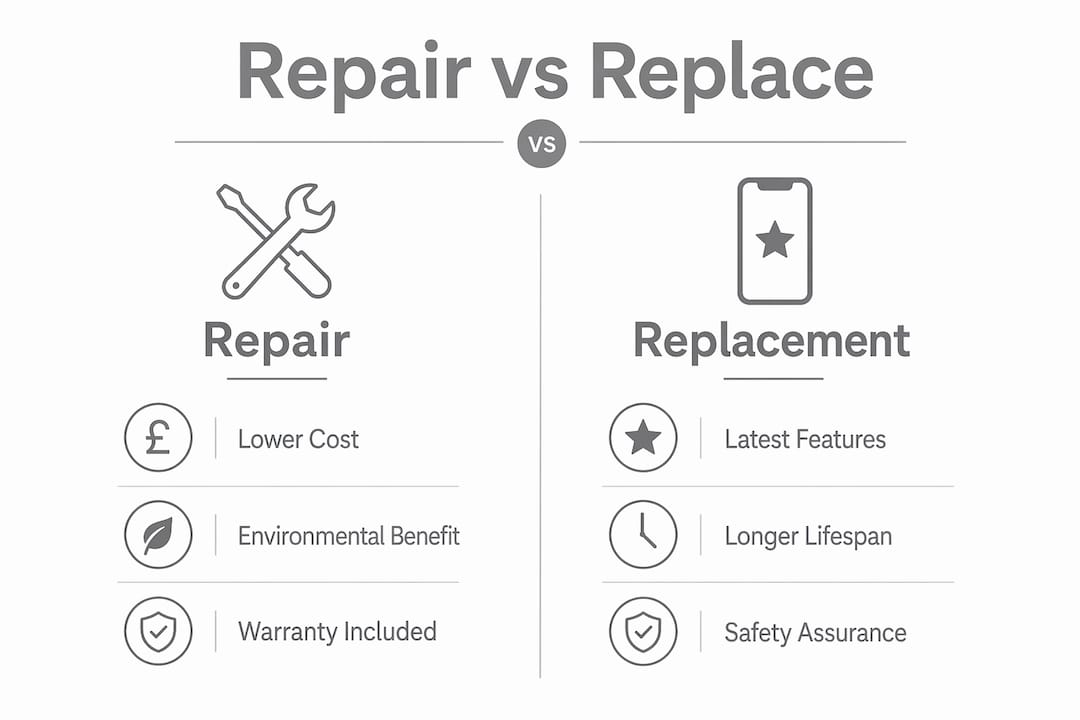
Warranty terms on the repair itself also matter. A repair backed by a 90-day or 12-month warranty reduces your financial risk considerably compared to an unguaranteed fix. Always ask what the repair covers and for how long before you agree to the work.
Pro Tip: Before getting a repair quote, check your device manufacturer’s website to confirm whether your model is still receiving software updates. If support has ended, factor that into your decision as a significant negative.
When does replacing your device make more sense?
Replacement is the right call in specific, identifiable situations. Recognising these early saves you from spending money on repairs that will not solve the underlying problem.
Clear signals that replacement is the better option include:
Repair costs near or above the 50% threshold with no meaningful lifespan extension on offer.
Recurring failures across multiple components. A device that has needed three separate repairs in 18 months is showing systemic decline. The risk of further faults is high.
End of software support. An iPhone or Android handset that no longer receives security updates carries real security risks, regardless of its hardware condition.
Discontinued spare parts. If genuine or quality replacement parts are no longer available for your model, any repair carries higher risk of poor-quality components being used.
Significant energy efficiency gains. Newer laptops and phones consume considerably less power than models from five or more years ago. Over two to three years, the energy savings can offset part of the replacement cost.
Safety concerns are also a legitimate reason to replace rather than repair. Swollen batteries, for example, present a fire risk and should be treated as urgent. If a repair cannot fully resolve a safety issue, replacement is not optional.
How to calculate cost per year of use
A cost-per-year comparison is the most reliable financial model for deciding whether to repair or replace electronics. It removes the emotion from the decision and gives you a clear number to work with.
Here is how to apply it:
Estimate the repair cost. Include labour, parts, and any accessories you will need to replace.
Estimate how many additional years of reliable use the repair will provide. Be realistic. A battery replacement on a three-year-old phone might give you two more years. A motherboard repair on a seven-year-old laptop might give you one.
Calculate repair cost per year. Divide the total repair cost by the estimated additional years of use.
Estimate the replacement cost per year. Take the price of a comparable new device, subtract its likely resale value at end of use, and divide by its expected lifespan in years.
Compare the two figures. The lower cost per year is the better financial choice.
A cost-per-year formula like this allows you to compare repair and replacement on equal terms, accounting for how long each option actually serves you.
Example calculation. Your iPhone screen is cracked and the repair quote is £150. You expect the phone to last another two years after repair. That gives a repair cost of £75 per year. A comparable new iPhone costs £800, with a likely resale value of £300 after four years. That is £500 net cost over four years, or £125 per year. In this case, repair wins clearly. You can find detailed phone repair costs for Apple, Google, and Samsung models to help you run these numbers accurately.
When the cost-per-year figures are close, qualitative factors tip the balance. Consider convenience, your attachment to the current device, and whether the new model offers features that genuinely matter to you. Repair is recommended when it meaningfully extends device life, for example by three or more years. Short-term patches offering six months or less of extra use rarely justify the expense.
Practical tips before you commit to a repair or replacement
Before you hand over your device or place an order for a replacement, a few straightforward checks can protect you from a poor decision.
Get at least two or three quotes. Wide discrepancies between quotes should prompt you to ask about parts quality and warranty terms. A cheap quote using low-grade components may cost you more in the long run.
Check parts availability for your model. iFixit maintains repairability guides for hundreds of devices. If genuine parts are scarce, factor that into your decision.
Ask about repair warranty. A reputable repair shop will offer at least a 90-day guarantee on parts and labour. Check the warranty and policy terms before committing.
Assess your downtime tolerance. If you rely on your device for work, ask how long the repair will take and whether a loan device is available.
Back up your data before any repair. Whether you repair or replace, a full backup protects you from data loss during the process.
Independent repair shops often offer faster turnaround and more competitive pricing than manufacturer-authorised service centres. The trade-off is that parts may vary in quality, so always ask specifically whether original or third-party components are being used.
Key takeaways
The repair-or-replace decision comes down to three things: whether the repair cost clears the 50% threshold, whether the device has meaningful life left in it, and whether software support will keep it usable.
Point | Details |
Use the 50% rule as your starting point | If repair costs less than half the replacement price, repair is usually the better financial choice. |
Calculate cost per year, not just upfront cost | Divide repair and replacement costs by expected years of use to find the true value of each option. |
Factor in software support | A device without ongoing security updates has limited useful life, even after a successful hardware repair. |
Watch for systemic failure signals | Recurring faults across multiple components indicate the device is declining and replacement is likely overdue. |
Account for switching costs | Data migration, new accessories, and setup time add real cost to replacement that most consumers overlook. |
My honest view on repair versus replace decisions
I have seen a lot of consumers make the same two mistakes. The first is spending money on a repair without checking whether the device will still receive software updates. You can fix the hardware perfectly and still end up with a device that is functionally obsolete within a year. The second mistake is the opposite: replacing a device because it feels old, when a £80 battery replacement would have given it two or three more good years.
The hidden switching costs are genuinely underestimated. Most people do not account for the time spent migrating data, reconfiguring apps, and replacing accessories. When you add those up honestly, the financial case for repair often becomes stronger than it first appears.
There is also an environmental argument worth taking seriously. Repairing avoids the carbon footprint embedded in manufacturing a new device. That is not a reason to repair a device that is genuinely past its useful life, but it is a real consideration when the financial case is borderline.
My advice: run the cost-per-year numbers, check the software support status, and get at least two repair quotes. If those three steps point clearly in one direction, follow them. Do not let emotional attachment to a new model or sunk cost thinking push you into a decision that does not hold up financially.
— Joshua
Get a fast, reliable repair quote from Rapidrepairsldn

Rapidrepairsldn specialises in phone, tablet, and laptop repairs across London, covering everything from cracked screens and battery replacements to complex motherboard faults. Every repair comes with a warranty, and most jobs are completed the same day. Whether you have an iPhone needing a screen repair, an iPad with a charging fault, or a laptop that will not power on, the team at Rapidrepairsldn can give you an honest quote and a clear recommendation before you commit to anything. If you are weighing up whether repair is worth it, start with a quote. Visit Rapidrepairsldn to book your repair or get in touch for advice on your specific device.
FAQ
What is the 50% rule for device repair?
The 50% rule states that if your repair quote exceeds 50% of the cost of a comparable replacement device, buying new is usually the better choice. Below that threshold, repair is generally more cost-effective.
How do I know if repair is worth it for my phone or laptop?
Calculate the cost per year of use for both options. Divide the repair cost by the additional years of reliable use it provides, then compare that figure to the net replacement cost divided by the new device’s expected lifespan.
When should I replace rather than repair my device?
Replace your device when repair costs approach the 50% threshold, when multiple components have failed, when the manufacturer no longer provides software updates, or when genuine spare parts are no longer available for your model.
Does repairing a device have environmental benefits?
Yes. Repairing avoids the carbon emissions associated with manufacturing a new device. Unless a new model offers significant energy efficiency gains that offset those emissions over time, repair is the greener option.
How do I get the best repair quote?
Obtain at least two or three quotes and ask each provider about parts quality and warranty coverage. Significant price differences between quotes usually indicate differences in component grade or repair guarantee terms.
Recommended
Comments